FIDO2 passkey storage with ESP32-S3 and RP2350
Passkeys can be stored on hardware keys. There are open source alternatives to commercial security keys like Yubikey. So I decided to set up one and get familiar with hardware keys in the process. The alternatives I tried use open source firmware and COTS microcontrollers. a SoC like this is not a secure element. a secure element is protected from hardware attacks, while generic SoCs are not always protected (and never by default), and if they are protected, it’s not from all attacks. in my current setup there is no secure boot and the efuses are not blown yet, so the key can be copied. Although it is possible with rp2350 and esp32-s3 to make the key relatively hardened 1 2 (not possible with rp2040), but it would be succeptible to some hardware attacks still. A device like this still has its applications, taking into account the threat model. The device uses FIDO2 authentication standard and works on both Windows and Linux. The following is how I set it up. starting from the easiest method, and finishing with the most complicated and secure. any method will write to OTP memory (so the device can never go back to its original state)
Updates: twitter in Chrome on Ubuntu asks for a touch but does not advance to PIN with RS-Key (probably because of a bug in the firmware) on rpi. RS-Key sends CTAPHID command 59 02 (CTAPHID_KEEPALIVE and “user presence needed”) while a legacy U2F/CTAPHID_MSG registration waits for the button. But it should emit keepalives only for CTAP2/CBOR; legacy U2F/MSG registration must wait silently while polling/retrying handles user presence. Chrome’s U2F implementation does not accept CTAPHID_KEEPALIVE in that flow, treats it as an unknown response, aborts the operation, and ignores the successful registration returned after touching the button. twitter works with pico-fido2 on s3 in the same browser just fine. google says “A passkey can’t be created on this device” at both on Ubuntu.
todo
- when secure boot become supported by https://github.com/librekeys/pico-fido2 for s3, burn efuses (when supported by picoforge)
- set up the secure boot and burn the efuses in the rpi key
host
Ubuntu, rootless docker
hardware
I’m keeping it very minimalistic: RP2350 and ESP32-S3. For S3 I went with MuseLab ESP32-S3 USB Dongle, which is very much like Lilygo t-dongle S3 but: without the screen (not needed), the sd card slot is inside the case (difficult to access, but I do not need the storage), the boot button is also difficult to access on a regular basis. and it’s almost half the price, 51元. RP2350 is a better choice because it supports OTP fuses and secure boot, I went with the 深圳市云造科技网络 RP2350 USB (the LED driver is WS2812 Neopixel, GPIO#22), a tiny naked board with usb A - 26元. I got it just for testing, this kind of usb PCB plug is very unreliable for daily use. also needs a heatshrink put onto it.
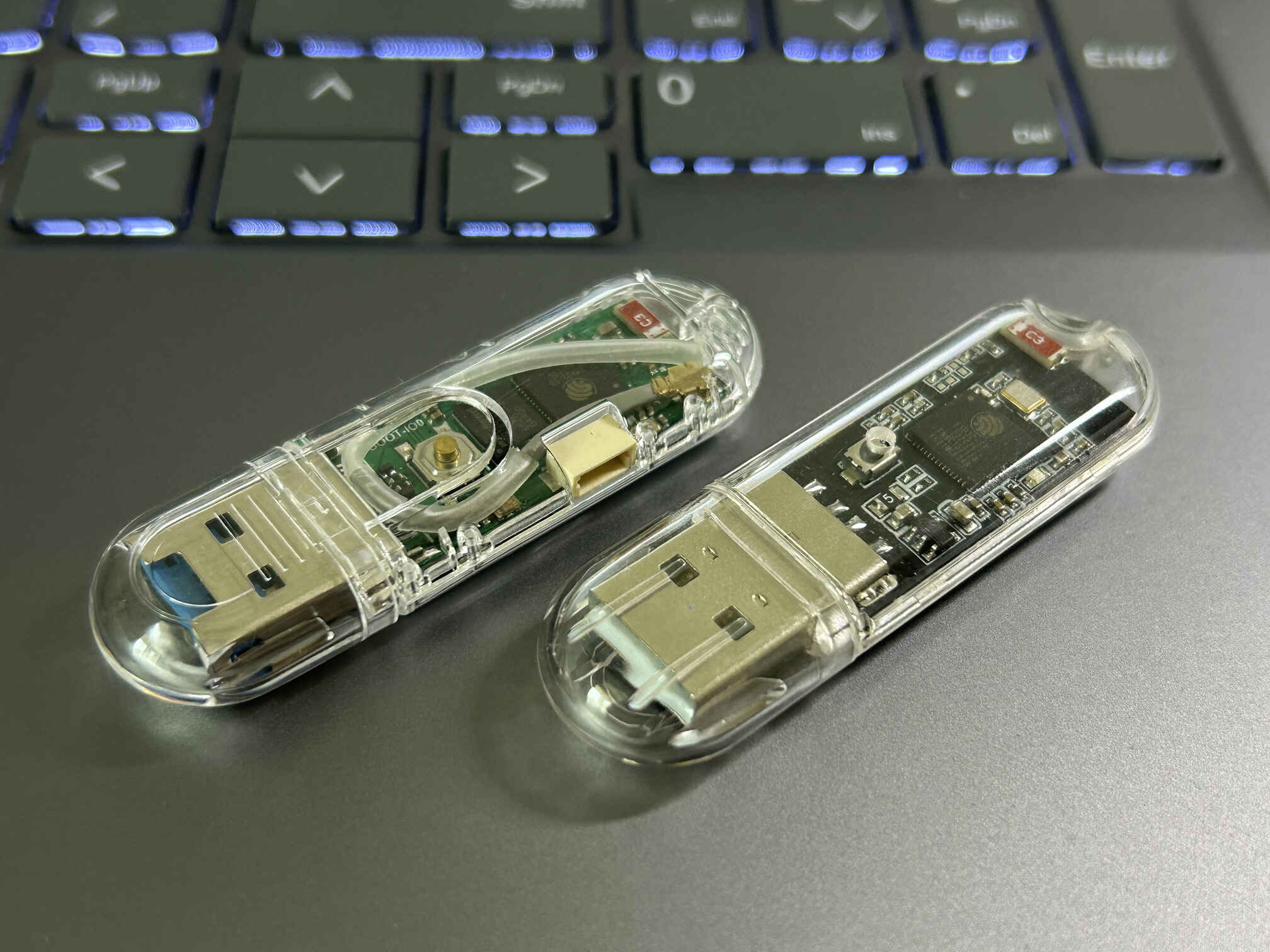
Lilygo t-dongle s3 (I added 2.4GHz antenna, IPEX-1 connector) on the left and Muse Lab ESP32-S3 USB Dongle on the right
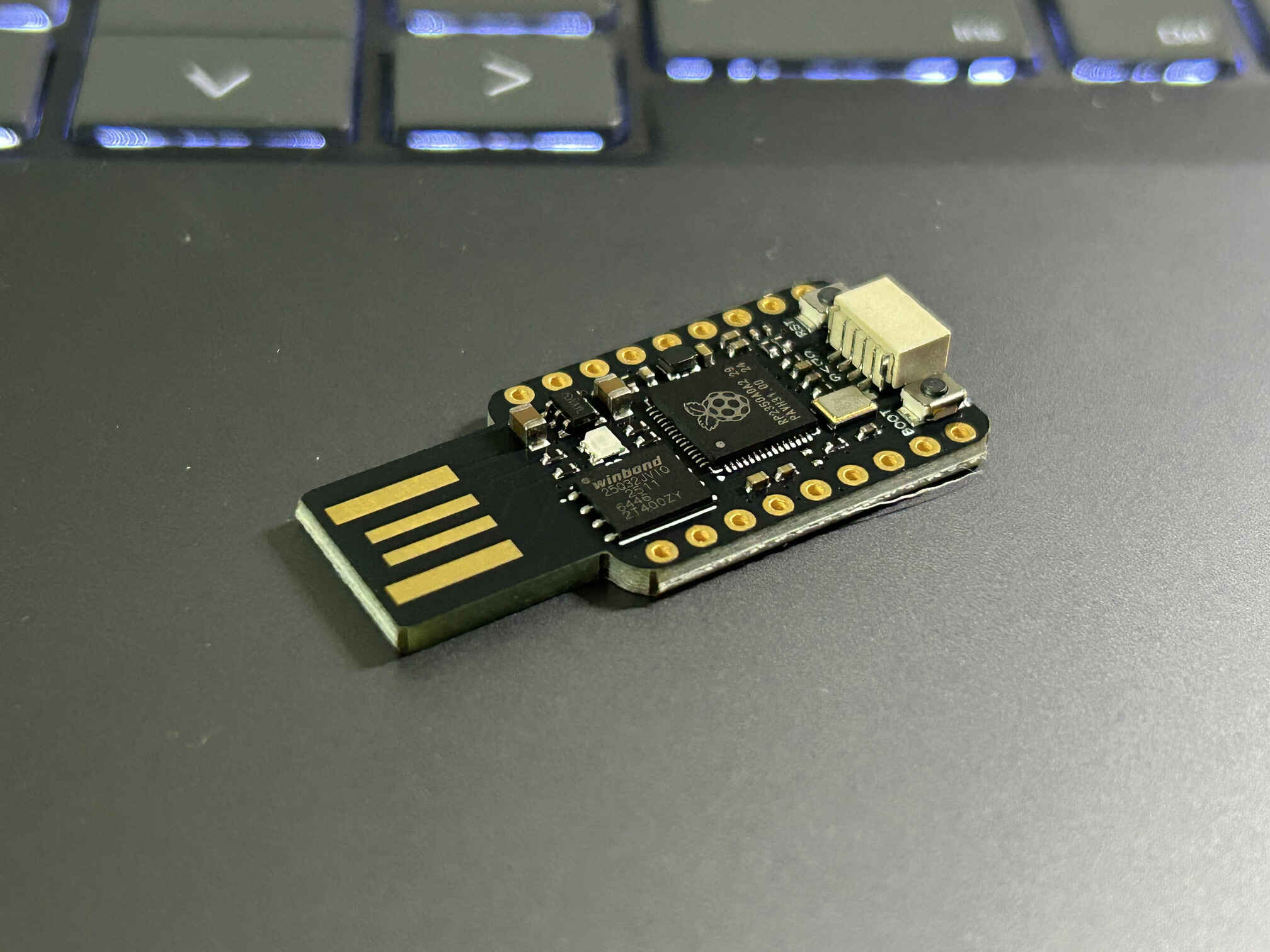
深圳市云造科技网络 RP2350 USB
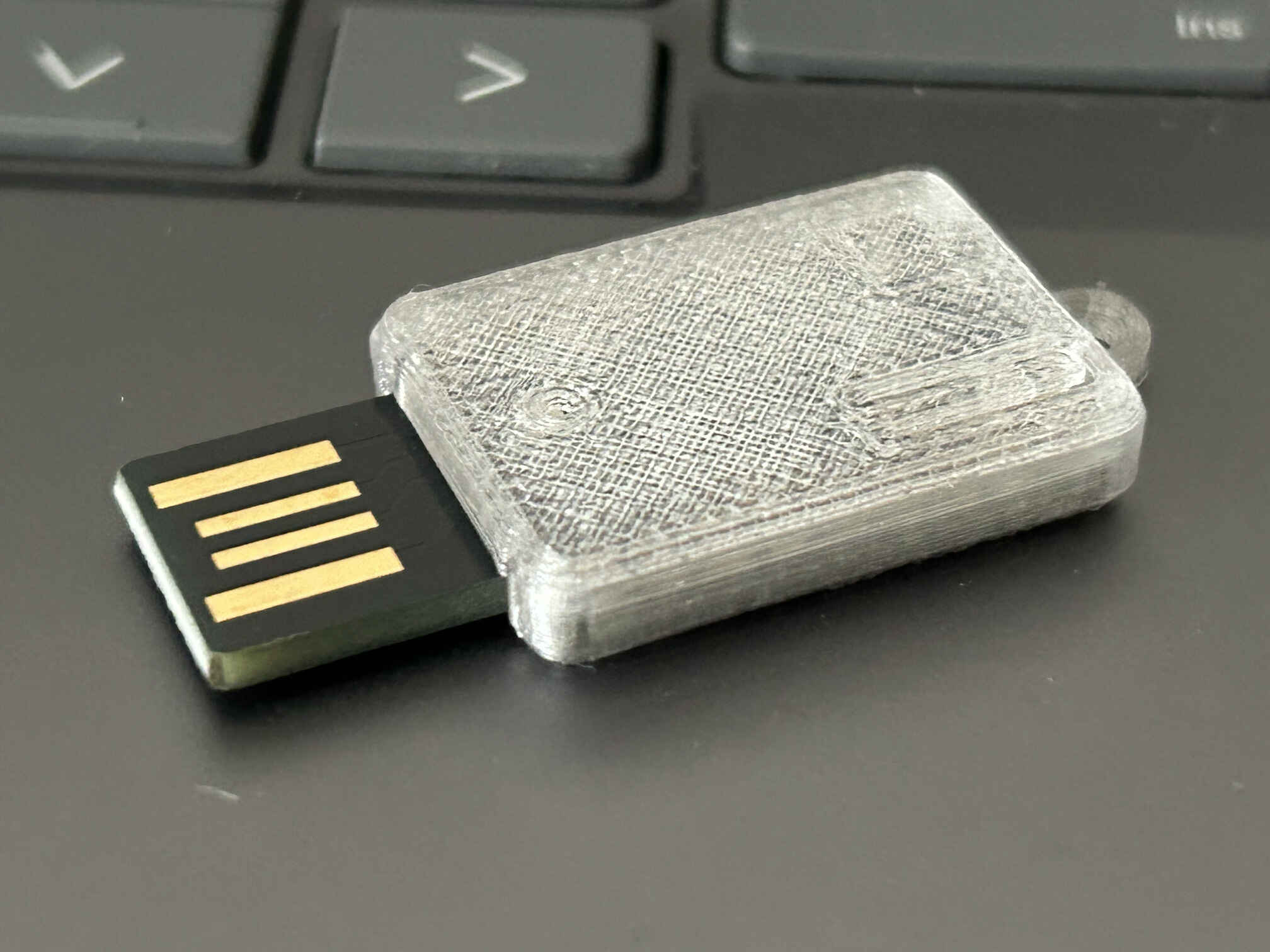
same stick board (but with Qwiic connector removed) in the case 3D printed with transparent PETG filament
pico-fido firmware, s3 - the easiest method
for my s3 I originally went with the original pico fido firmware, flashed it in Chrome at https://www.picokeys.com/esp32-flasher/ . rp2350 need to drag the downloaded uf2 firmware file onto it’s storage partition while mounted in bootloader mode.
change the VID:PID to Yubikey5’s 0x1050:0x0407 with picoforge or other tool if possible, i didn’t dig too much into it.
pico-fido2 firmware with hardcoded boot-key, s3 and rp2350 - the easy way, compile from source code, safer and more configurable
this is irreversible and the board can only be locked to the hardcoded digest derived from the firmware maintainer’s cert. in case of rp2350, the firmware will write to OTP memory page 58 on the first start. if plan to properly secure the key later, the better option is NOT to follow this section and follow securing rp2350 (irreversible) with our own cert section instead right from the start, this way the board will be locked only to a cert that we own and not also to the maintainer’s.
at the very first start on the device pico-fido2 firmware generates a random 256-bit MKEK mask, generates a secp256k1 device identity key and writes both to page 58 of the OTP memory and locks the page. this is irreversible. RS-Key firmware must do something along the same lines too.
for rp2350 I first tried https://github.com/TheMaxMur/RS-Key/ as it supports all the features of the pico-fido2 and it was build specifically as an open-source alternative to the pico-fido2 that went commercial and nuked the open-source repo. but because of (possibly) a bug in the firmware that stopped me from registering the key with twitter, I later switched to https://github.com/librekeys/pico-fido2 which is an attempt to save the last known open-source version of pico-fido2.
downloading the source code would take a while:
1
2
3
4
5
6
7
8
9

git clone --depth 1 --recursive https://github.com/raspberrypi/pico-sdk.git
git clone --depth 1 --recursive https://github.com/raspberrypi/picotool.git

git clone --filter=blob:none --no-checkout https://github.com/librekeys/pico-fido2.git
cd pico-fido2
git fetch --depth 1 origin 391252e5e84b475add357ea0d3e5c79b7e42ace8
git checkout 391252e5e84b475add357ea0d3e5c79b7e42ace8
git submodule update --init --recursive --depth 1
at the moment of writing it was --branch v7.4.2-librekeys
then we need a build environment with tools.
prepare the dockerfiles:
1
2
3
4
5
6
7
8
9
10
11
12
13
14
15
16
17
18
19
20
21
22
23
24
25
26
27
28
cat > Dockerfile.esp32s3 <<'EOF'
FROM espressif/idf:v5.5

WORKDIR /workspace/pico-fido2
EOF

cat > Dockerfile.rp2350 <<'EOF'
FROM ubuntu:24.04

RUN apt-get update && DEBIAN_FRONTEND=noninteractive apt-get install -y --no-install-recommends \
        build-essential cmake python3 gcc-arm-none-eabi libnewlib-arm-none-eabi \
        libstdc++-arm-none-eabi-newlib libusb-1.0-0-dev pkg-config \
    && rm -rf /var/lib/apt/lists/*

COPY pico-sdk /opt/pico-sdk
COPY picotool /opt/picotool

RUN cmake -S /opt/picotool -B /opt/picotool/build -DPICO_SDK_PATH=/opt/pico-sdk \
    && cmake --build /opt/picotool/build --parallel \
    && cmake --install /opt/picotool/build

ENV PICO_SDK_PATH=/opt/pico-sdk

WORKDIR /workspace/pico-fido2
EOF

docker --context rootless build -t pico-fido2-esp32s3 -f Dockerfile.esp32s3 .
docker --context rootless build -t pico-fido2-rp2350 -f Dockerfile.rp2350 .
flashing. the firmware will be built at the container start. put the rpi into bootloader mode. s3 can stay in the serial console mode, or put into bootloader mode if it was already flashed before
1
2
3
4
5
6
7
8
9
10
11
12
13
14
15
16
17
#rpi
# set the permissions
USB_REL="$(lsusb | awk '/Raspberry Pi RP2350 Boot/ {sub(/:$/, "", $4); print $2 "/" $4; exit}')" &&
[ -n "$USB_REL" ] &&
[ -c "/dev/bus/usb/$USB_REL" ] &&
sudo setfacl -m "u:$(id -un):rw" "/dev/bus/usb/$USB_REL"

rm -rf pico-fido2/build-rp2350

docker --context rootless run --rm \
  -v /dev/bus/usb:/dev/bus/usb \
  -v "$PWD:/workspace" \
  pico-fido2-rp2350 \
  bash -lc 'cmake -S . -B build-rp2350 -DPICO_BOARD=pico2 -DVIDPID=Yubikey5 &&
    cmake --build build-rp2350 --parallel &&
    picotool load -v build-rp2350/pico_fido2.uf2 &&
    picotool reboot'
1
2
3
4
5
6
7
8
9
10
11
12
13
14
15
16
17
#s3
sudo setfacl -m "u:$USER:rw" /dev/ttyACM0
rm -rf pico-fido2/build pico-fido2/release pico-fido2/sdkconfig pico-fido2/sdkconfig.old

docker --context rootless run --rm \
  --device /dev/ttyACM0:/dev/ttyACM0 \
  --group-add "$(stat -c '%g' /dev/ttyACM0)" \
  --tmpfs /tmp:rw,exec,nosuid,size=256m \
  -v "$PWD:/workspace" \
  pico-fido2-esp32s3 \
  bash -lc 'idf.py set-target esp32s3 &&
    idf.py -DVIDPID=Yubikey5 build && mkdir -p release &&
    (cd build && esptool.py --chip ESP32-S3 merge_bin \
      -o ../release/pico_fido_esp32-s3.bin @flash_args) &&
      esptool.py --chip esp32s3 --port /dev/ttyACM0 erase_flash &&
    esptool.py --chip esp32s3 --port /dev/ttyACM0 --baud 460800 \
      write_flash 0x0 release/pico_fido_esp32-s3.bin'
backup and restore (of unencrypted firmware). for testing, not really useful
all done in the bootloader mode, set the permissions first.
s3
1
2
3
4
5
6
7
8
9
10
11
12
13
14
15
16
17
18
#backup
docker --context rootless run --rm \
  --device /dev/ttyACM0:/dev/ttyACM0 \
  --group-add "$(stat -c '%g' /dev/ttyACM0)" \
  -v "$PWD:/workspace" \
  pico-fido2-esp32s3 \
  esptool.py --chip esp32s3 --port /dev/ttyACM0 --baud 460800 \
    read_flash 0 ALL /workspace/esp32s3-backup.bin

#restore
docker --context rootless run --rm \
  --device /dev/ttyACM0:/dev/ttyACM0 \
  --group-add "$(stat -c '%g' /dev/ttyACM0)" \
  -v "$PWD:/workspace" \
  pico-fido2-esp32s3 \
  bash -lc 'esptool.py --chip esp32s3 --port /dev/ttyACM0 erase_flash &&
  esptool.py --chip esp32s3 --port /dev/ttyACM0 --baud 460800 \
    write_flash 0 /workspace/esp32s3-backup.bin'
rpi
1
2
3
4
5
6
7
8
9
10
11
12
13
14
#backup
docker --context rootless run --rm \
  -v /dev/bus/usb:/dev/bus/usb \
  -v "$PWD:/workspace" \
  pico-fido2-rp2350 \
  picotool save -a -v /workspace/rp2350-backup.bin -t bin

#restore
docker --context rootless run --rm \
  -v /dev/bus/usb:/dev/bus/usb \
  -v "$PWD:/workspace" \
  pico-fido2-rp2350 \
  bash -lc 'picotool load --ignore-partitions -v \
    /workspace/rp2350-backup.bin -t bin && picotool reboot'
management
I use picoforge to manage the device. Works on Windows and Linux, for Ubuntu I did
1
2
3
4
5
6
sudo apt install pcscd
# also install fuse3 for appimage if not already installed
sudo systemctl enable --now pcscd
wget https://github.com/librekeys/picoforge/releases/download/v0.9.0/picoforge_0.9.0_glibc-2.28_x86-64.AppImage
chmod u+x picoforge_0.9.0_glibc-2.28_x86-64.AppImage
./picoforge_0.9.0_glibc-2.28_x86-64.AppImage
initial setup of the key
open picoforge and set the PIN. optionally, one can change the default lentgh of the PIN from 4 to something longer. picoforge listed secure boot as a feature for future releases, so it will be possible to make this storage more secure later. set touch timeout to a non-zero value. adjust the LED brightness, I set it to 1. for rp2350 set led driver to WS2812 and LED GPIO pin to 22. set vendor preset to yubikey5 for compatibility (no need for udev rules). I didn’t find the correct GPIO pin for the s3 (pin 1 as it was stated in the schematics is not working)
securing rp2350 (irreversible) with our own cert
OTP memory changes. this is irreversible
Firmware signing key controls the secure boot (firmware that is not signed with the key will not run). device encryption keys are generated by pico-fido2 on first boot and stored in page 58 of the OTP memory. secure lock invalidates all other boot-key slots, disables debugging, enables the glitch detector at maximum sensitivity, locks boot-related OTP pages.
the plan: generate our own firmware signing key, patch pico-fido2 to use the boot-key digest derived from the signing key, build signed firmware, let the firmware’s cmd_secure provision the MKEK mask and device key into OTP on the first boot. burn an unused BOOTKEY slot and enable secure boot, enable secure lock.
if rpi was flashed with the original software containing the hardcoded boot-key digest, it will fail to enable secure boot with digest derived from our certificate. so we need a completely new device, not flashed with this firmware before.
first sudo apt install opensc pcscd if not already.
- create EC P-256 signing key that will be used to sign the firmware builds.
1
2
3
4
5
6
7
8
mkdir -m 700 rp2350-secrets
openssl ecparam -name secp256k1 -genkey \
  -out rp2350-secrets/firmware-signing.pem

chmod 600 rp2350-secrets/firmware-signing.pem

openssl ec -in rp2350-secrets/firmware-signing.pem \
  -pubout -out rp2350-secrets/firmware-signing-public.pem
without this certificate we would not be able to reflash the device after enabling secure boot.
next problem is that boot-key digest (that is derived from the firmware maintainer’s certificate that we do not have) is hardcoded into the firmware. we need to derive new boot key digest from the public key of the cert that we own and then patch the source code with the new digest.
build unsigned elf:
1
2
3
4
5
6
7
8
docker --context rootless run --rm \
  -v "$PWD:/workspace" \
  pico-fido2-rp2350 \
  bash -lc '
    rm -rf build-keyhash &&
    cmake -S . -B build-keyhash -DPICO_BOARD=pico2 -DVIDPID=Yubikey5 &&
    cmake --build build-keyhash --parallel
    '
calculate the new digest:
1
2
3
4
5
6
7
8
docker --context rootless run --rm \
  -v "$PWD:/workspace" \
  pico-fido2-rp2350 \
  picotool seal --sign \
    /workspace/pico-fido2/build-keyhash/pico_fido2.elf \
    /tmp/pico_fido2.signed.elf \
    /workspace/rp2350-secrets/firmware-signing.pem \
    /workspace/bootkey.json
patch hardcoded in BOOTKEY boot-key digest value:
1
2
3
4
5
6
7
8
9
10
11
12
13
14
15
16
17
18
19
20
21
22
23
24
25
26
27
28
29
30
31
32
33
34
35
python3 - <<'PY'
import json
import re
from pathlib import Path

path = Path("pico-fido2/pico-keys-sdk/src/fs/otp.c")
digest = bytes(json.loads(Path("bootkey.json").read_text())["bootkey0"])

if len(digest) != 32:
    raise SystemExit(f"Expected 32 bytes, found {len(digest)}")

# One literal backslash per C hexadecimal escape.
c_string = "".join(f"\\x{byte:02x}" for byte in digest)

source = path.read_text()

pattern = (
    r'(alignas\(2\)\s+uint8_t\s+BOOTKEY\[\]\s*=\s*")'
    r'[^"]*'
    r'(";)'
)

source, count = re.subn(
    pattern,
    lambda match: match.group(1) + c_string + match.group(2),
    source,
)

if count != 2:
    raise SystemExit(f"Expected 2 declarations, found {count}")

path.write_text(source)

print("Patched both values:", digest.hex())
PY
there is a bug in pico-fido2 firmware in this commit. bootkey is set as alignas(2) uint8_t BOOTKEY[] = . because it contains 32 digest bytes plus an implicit NUL, when code later does sizeof(BOOTKEY) it gets 33, and OTP size is 32, so everything fails. so we need to declare constants with intended fixed size to fix this bug.
patch:
1
2
3
4
5
6
7
8
9
10
11
12
13
14
15
16
17
python3 - <<'PY'
from pathlib import Path

path = Path("pico-fido2/pico-keys-sdk/src/fs/otp.c")
source = path.read_text()

old = "uint8_t BOOTKEY[]"
new = "uint8_t BOOTKEY[32]"

count = source.count(old)
if count != 2:
    raise SystemExit(f"Expected 2 BOOTKEY[] declarations, found {count}")

path.write_text(source.replace(old, new))
print("Patched exactly 2 declarations: BOOTKEY[] -> BOOTKEY[32]")
PY
build signed firmware
1
2
3
4
5
6
7
8
9
10
11
12
docker --context rootless run --rm \
  -e SECURE_BOOT_PKEY=/run/secrets/firmware-signing.pem \
  -v "$PWD:/workspace" \
  -v "$PWD/rp2350-secrets/firmware-signing.pem:/run/secrets/firmware-signing.pem:ro" \
  pico-fido2-rp2350 \
  bash -lc '
    rm -rf build-rp2350 &&
    cmake -S . -B build-rp2350 \
      -DPICO_BOARD=pico2 -DVIDPID=Yubikey5 \
      -DSECURE_BOOT_PKEY="$SECURE_BOOT_PKEY" &&
    cmake --build build-rp2350 --parallel
  '
verify it contains the new digest:
1
2
3
4
5
6
7
8
9
10
11
12
13
14
15
16
17
python3 - <<'PY'
import json
from pathlib import Path

digest = bytes(json.loads(Path("bootkey.json").read_text())["bootkey0"])
obj = Path(
    "pico-fido2/build-rp2350/CMakeFiles/pico_fido2.dir/"
    "pico-keys-sdk/src/fs/otp.c.o"
).read_bytes()
elf = Path("pico-fido2/build-rp2350/pico_fido2.elf").read_bytes()

print("object occurrences:", obj.count(digest))
print("ELF occurrences:   ", elf.count(digest))

if obj.count(digest) == 0 or elf.count(digest) == 0:
    raise SystemExit("Expected digest is absent from compiled firmware")
PY
and if we disassemble it, for the digest we will see movs r2, #32 and not 33 :
1
2
3
4
5
6
7
8
9
docker --context rootless run --rm \
  -v "$PWD:/workspace:ro" \
  pico-fido2-rp2350 \
  bash -lc '
    arm-none-eabi-objdump -dr \
      build-rp2350/CMakeFiles/pico_fido2.dir/pico-keys-sdk/src/fs/otp.c.o |
    sed -n \
      "/<otp_is_secure_boot_enabled>/,/<otp_is_secure_boot_locked>/p"
  '
if we disassemble the provisioning function part it must also be 32 near otp_write_data:
1
2
3
4
5
6
7
8
9
docker --context rootless run --rm \
  -v "$PWD:/workspace:ro" \
  pico-fido2-rp2350 \
  bash -lc '
    arm-none-eabi-objdump -dr \
      build-rp2350/CMakeFiles/pico_fido2.dir/pico-keys-sdk/src/fs/otp.c.o |
    sed -n \
      "/<otp_enable_secure_boot>/,/<otp_invalidate_key>/p"
  '
now we have the signed version in pico-fido2/build-rp2350/pico_fido2.uf2, to verify:
1
2
3
4
5
docker --context rootless run --rm \
  -v "$PWD:/workspace:ro" \
  pico-fido2-rp2350 \
  picotool info -a \
    /workspace/pico-fido2/build-rp2350/pico_fido2.uf2
should say signature: verified
turn on the board in bootloader mode, set the premissions
1
2
3
4
USB_REL="$(lsusb | awk '/Raspberry Pi RP2350 Boot/ {sub(/:$/, "", $4); print $2 "/" $4; exit}')" &&
[ -n "$USB_REL" ] &&
[ -c "/dev/bus/usb/$USB_REL" ] &&
sudo setfacl -m "u:$(id -un):rw" "/dev/bus/usb/$USB_REL"
then flash the signed firmware:
1
2
3
4
5
6
7
8
9
10
11
docker --context rootless run --rm \
  -v /dev/bus/usb:/dev/bus/usb \
  -v "$PWD:/workspace" \
  pico-fido2-rp2350 \
  bash -lc '
    picotool load -v \
      /workspace/pico-fido2/build-rp2350/pico_fido2.uf2 &&
    picotool verify \
      /workspace/pico-fido2/build-rp2350/pico_fido2.uf2 &&
    picotool reboot
  '
it will restart in application mode. confirm that fw is operational
1
2
opensc-tool \
  --send-apdu 00A4040008A0583FC19B7E4F21
reconnect it again in bootloader mode. set the permissions again. then save the current OTP state
1
2
3
4
5
docker --context rootless run --rm \
  -v /dev/bus/usb:/dev/bus/usb \
  -v "$PWD:/workspace" \
  pico-fido2-rp2350 \
  picotool otp dump --output /workspace/otp-before-secure-boot.json
backup the jsons, uf2, and the pem certs. sha256sum rp2350-secrets/firmware-signing.pem bootkey.json > checksums.txt just in case
1
2
sha256sum rp2350-secrets/firmware-signing.pem bootkey.json
cat checksums.txt
let’s burn some eFuses. this is irreversible.
i was stuck here at enabling secure boot because apparently there is a bug in the firmware, digest length is being provisioned one byte longer that the otp. it fails when i try to enable secure boot. sizeof(BOOTKEY) is 33 because of the terminating NUL. The RP2350 ROM API requires ECC data in 2-byte values, so a 33-byte ECC write is invalid. It returns an error before writing anything. 64 00 means pico-fido2’s OTP operation failed. after that patch above it is working now.
restart in application mode. command the firmware to provision the secure boot, without secure lock first. this is irreversible and will tie the board to our cert in slot 0, but we still have 3 more slots to write other certs. after this change the board will only boot signed firmware. at this point we still can add other boot keys and replace the firmware with another signed with another cert.
1
2
3
4
5
opensc-tool \
  --send-apdu 00A4040008A0583FC19B7E4F21 \
  --send-apdu 801D000000

# should return Received (SW1=0x90, SW2=0x00), means command success
power cycle, reboot in bootloader mode, set permissions and check
1
2
3
4
docker --context rootless run --rm \
  -v /dev/bus/usb:/dev/bus/usb \
  pico-fido2-rp2350 \
  picotool info -a
it should say
1
2
3
4
5
6
 signature:              verified
 current cpu:            ARM
 available cpus:         ARM
 secure boot:            1
 debug enable:           1
 secure debug enable:    1
save the pre-lock state
1
2
3
4
5
6
7
docker --context rootless run --rm \
  -v /dev/bus/usb:/dev/bus/usb \
  pico-fido2-rp2350 \
  picotool otp get -r -n \
    crit1 boot_flags1 \
    page1_lock0 page1_lock1 \
    page2_lock0 page2_lock1 > pre-lock.txt
reboot, check if it works opensc-tool --list-readers. put into bootloader mode again, set the permissions. save the OTP state:
1
2
3
4
5
docker --context rootless run --rm \
  -v /dev/bus/usb:/dev/bus/usb \
  -v "$PWD:/workspace" \
  pico-fido2-rp2350 \
  picotool otp dump --output /workspace/otp-secure-boot-enabled.json
try reflashing with the signed (pico-fido2/build-rp2350/pico_fido2.uf2, it should boot) firmware and unsigned firmware (pico-fido2/build-keyhash/pico_fido2.uf2, it should flash but shouldn’t boot)
let’s burn some more eFuses. this is irreversible.
enable secure lock. this will also invalidate the rest of the boot-key slots 1 through 3 and make it impossible to add another boot key and run firmware signed with other cert. boot in application mode, then:
1
2
3
4
5
6
7
8
9
opensc-tool \
  --send-apdu 00A4040008A0583FC19B7E4F21 \
  --send-apdu 801D000100

# 80 1D 00 01 00
#    │ │ │ └─ Le=00
#    │ │ └──── P2=01: request permanent secure lock
#    │ └─────── P1=00: boot-key slot 0
#    └────────── INS=1D: cmd_secure()
it should say Received (SW1=0x90, SW2=0x00) as success
power off for a few seconds, reconnect in bootloader mode, set permissions, verify
1
2
3
4
docker --context rootless run --rm \
  -v /dev/bus/usb:/dev/bus/usb \
  pico-fido2-rp2350 \
  picotool info -a
should return
1
2
3
4
5
 signature:              verified
 available cpus:         ARM
 secure boot:            1
 debug enable:           0
 secure debug enable:    1
can also compare the locks
1
2
3
4
5
6
7
docker --context rootless run --rm \
  -v /dev/bus/usb:/dev/bus/usb \
  pico-fido2-rp2350 \
  picotool otp get -r -n \
    crit1 boot_flags1 \
    page1_lock0 page1_lock1 \
    page2_lock0 page2_lock1 > post-lock.txt
then diff -u pre-lock.txt post-lock.txt
it is fully locked now. yay! now writing any firmware to this key would require it to be signed by our cert. all debug is disabled, including secure debug (because it follows the global control).
storing ssh keys (not tested yet)
https://themaxmur.github.io/RS-Key/guides/ssh.html#enroll
optional
might as well install sudo apt install libfido2-1 libfido2-dev libfido2-doc fido2-tools for additional diagnostics:
1
2
3
fido2-token -L
fido2-token -I  /dev/hidraw1
fido2-token -I -d /dev/hidraw1
3D printed case for rpi2350 stick
- https://www.thingiverse.com/thing:7035066
references
- https://tutoduino.fr/en/discovering-fido2-and-passkeys/
- https://webauthn.io/
- https://demo.yubico.com/webauthn-technical/registration
- https://github.com/librekeys/pico-fido2
- https://docs.picokeys.com/picofido/passkeys/
- http://www.linux-usb.org/usb.ids
- https://themaxmur.github.io/RS-Key/quickstart.html
- https://nixos.org/download/
- https://espressif.github.io/esptool-js/
- https://esptool.spacehuhn.com/